

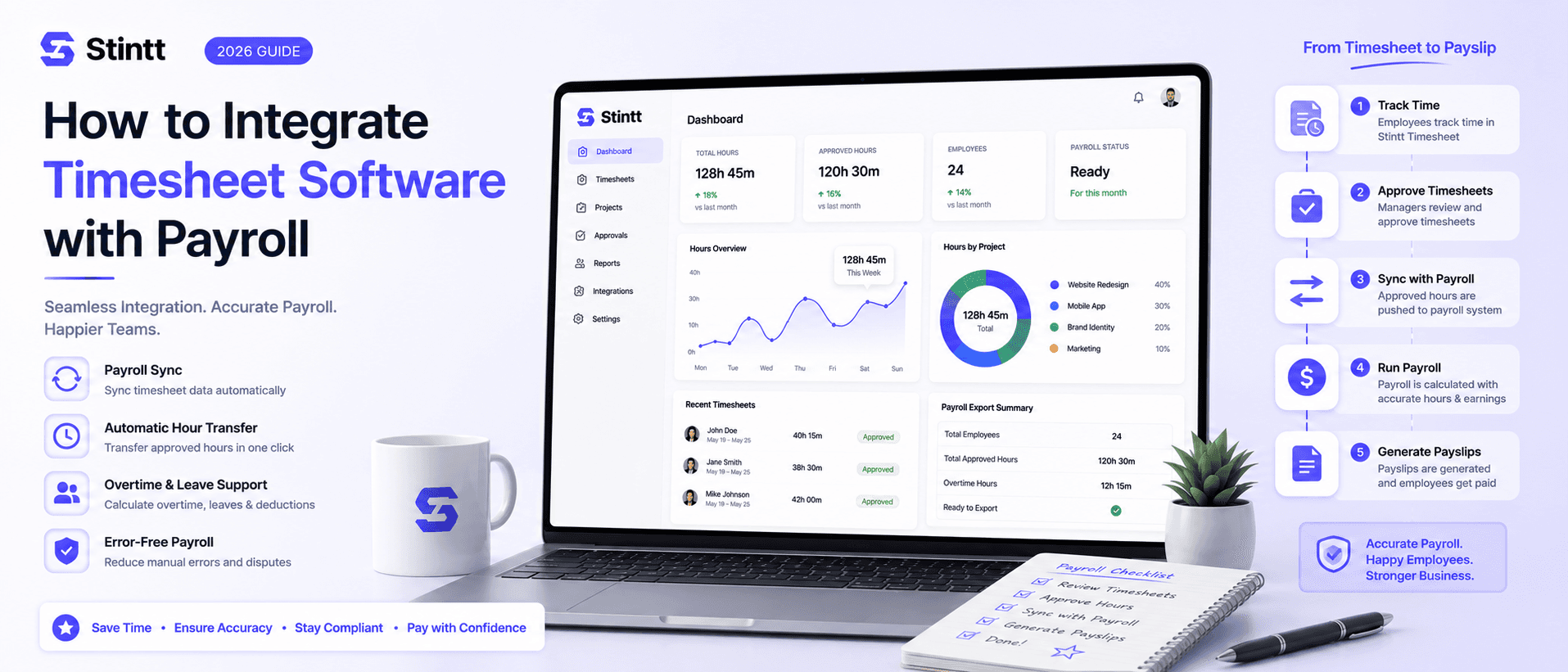
How to Integrate Timesheet Software with Payroll
Manual re-entry is where most payroll errors live — it's the source of roughly 72% of payroll issues. Connecting your timesheet software directly to the payroll engine closes that gap, cutting errors by up to 80% and halving admin time. This guide walks through mapping the data flows, building approval workflows and audit trails, and testing the setup before payday.
How to Integrate Timesheet Software with Payroll
Manual re-entry is where most payroll errors live. Every time hours, overtime, and leave get retyped from one system into another, there's another chance to fumble a number — and teams lose real time shuffling data between tools that don't talk to each other.
Connecting your timesheet software to the payroll engine closes that gap. When hours, overtime, and leave flow through cleanly instead of being retyped, there's simply less to get wrong and less admin to do. If your team runs on Google Workspace, Stintt does the front half of that job by turning calendar events into accurate labor logs — no manual entry to get wrong in the first place.
Here's how to set the integration up properly, from mapping the data to testing it before payday.
Why the connection is worth building
Good time data does more than feed payroll. It shows you capacity, flags meeting overload, and captures focus time you'd otherwise lose track of. Once the numbers are accurate, the downstream wins follow:
- No manual entry — removing the retyping step behind most payroll errors.
- Real-time labor cost visibility — review wages and overtime before you finalize a run, not after.
- Faster processing — integrated systems cut out the retyping and reconciliation that slow a cycle down.
- Fewer disputes — pay errors erode trust and are a real retention risk.
- Cleaner compliance — precise, auditable records that hold up under the Fair Labor Standards Act.
Pick an integration method
Most teams choose between two paths: an all-in-one platform that houses both time tracking and payroll, or a specialized time tool that hands off to your existing payroll system. Neither is automatically better — it depends on how attached you are to your current payroll provider.
Whichever you pick, look for a connection that syncs without custom code and handles the messy variables:
- Automated syncing that kills manual re-entry during the payroll cycle.
- Cost visibility to catch overtime and discrepancies before final processing.
- Support for shift differentials, tips, and accrued PTO.
- Multi-rate handling for people who move between departments or job sites.
Map the data flows first
Before connecting anything, document how information actually moves between systems. Define the source, direction, and frequency of every field — hours, overtime, leave balances — so they land in payroll accurately instead of needing manual reconciliation later.
Then settle on a single source of truth for employee attributes. Hire dates, work locations, exempt status: these have to read identically across your HR, timekeeping, and payroll platforms. Conflicting records are where expensive payroll errors start.
For reliability, use a hybrid setup. Real-time webhooks push individual updates the moment they happen, while a nightly batch job reconciles everything in bulk. Managers get immediate visibility; your audit trail gets long-term integrity.
Before you flip it on:
- Audit existing fields for consistent employee IDs and pay codes.
- Write down clear workweek policies so overtime and breaks calculate the same way every time.
- Automate recurring syncs to cut manual touches.
- Confirm exports line up with local labor law.
Build approval workflows and handle exceptions
An integration that just moves data isn't enough — you need a review layer. Route exceptions like late punches and missing clock-outs to the right person automatically, so errors get caught before they hit a payroll run rather than after. Tools like Stintt give managers real-time visibility to fix discrepancies as they surface.
Set conditional routing based on manager hierarchy, project, or overtime status. Beyond saving time, this is genuine protection during a wage-and-hour audit: being able to show hours were vetted by someone who actually knew the schedule is exactly the due diligence the FLSA expects.
- Auto-resolve minor issues under a set threshold so managers aren't drowning in trivial approvals.
- Trigger alerts as employees approach overtime limits.
- Log the timestamp and identity of anyone who approves or edits an entry.
- Open a review window 24 to 48 hours before processing to reconcile exceptions.
Keep an audit trail that holds up
Accurate timekeeping is the foundation payroll rests on, and every adjustment needs a record behind it. Meeting standards like the FLSA's recordkeeping rules means logging the timestamp, the user who made each change, and the reason or approval code. In wage-and-hour litigation, that log is your primary defense.
Run regular reconciliations too — compare raw timecard totals directly against payroll figures, broken out by pay code or cost center, so you catch discrepancies before they become payment disputes. Automated exception reports let managers chase only the flagged anomalies instead of hand-auditing every entry.
Avoid the usual timesheet mistakes

The failure modes are predictable. Reconstructing a week from memory on Friday afternoon is where calculation errors and missing hours creep in. Failing to separate admin from core project work hides your true capacity and wrecks job costing. Inconsistent tagging creates approval bottlenecks and data nobody trusts for billing.
Practical fixes:
- Stop relying on retrospective memory — capturing time as it happens is more reliable.
- End fragmented record-keeping across disconnected tools; build one source of truth.
- Capture data passively during the workday so it stays consistent.
- Watch for burnout signals in calendar load that manual logs miss entirely.
- Base project estimates on actual categorized time, not guesswork.
Categorizing straight from Google Calendar entries removes most of this by design — there's nothing to hand-tag and nothing to reconstruct.
Set deadlines and policies people can follow
Consistency is what makes any of this stick. Set a hard time-entry deadline 24 to 48 hours before payroll processing, so managers have a real window to review hours, resolve missed punches, and act on any unusual patterns flagged early.
Standardize how the tool is used, too. For Google Workspace teams, Stintt's AI categorization tags and organizes entries automatically, which keeps reporting and invoicing predictable without extra work from anyone.
Adoption depends on transparency. People embrace tracking when they see how it protects them — fair pay, better workload visibility, and real-time insight into their own time. Address privacy head-on: role-based permissions and encryption reassure the team that their activity data stays secure and professional.
Let AI do the categorizing

The real payoff of automation is turning raw calendar data into something useful. By reading keywords and event types, Stintt sorts work sessions into meetings, focus work, admin, and breaks with no manual tagging — which keeps billing data precise all week instead of scrambled on Friday.
It also works as a diagnostic. Surfacing heavy meeting loads highlights burnout risk early, so leaders can rebalance before a project slips. And because the categorized history stays in one place, managers get a clearer picture of where time actually goes — grounding planning in real numbers rather than gut feel.
Test before you go live

Don't switch cold. The goal is to prove your specific pay rules and overtime settings translate correctly into exported data before real paychecks depend on it. Verified hours should export cleanly into payroll-ready formats like CSV or a custom template.
Validating your setup:
- Pilot with a small group before the org-wide rollout to surface bottlenecks.
- Run a sample week simulating real chaos — late submissions, missed timers, last-minute client changes.
- Run parallel payroll, comparing old-system results against the new output before you retire the legacy tool.
- Import historical data, including year-to-date earnings, so nothing breaks mid-fiscal-year.
Choose tools that fit how you actually work
Start from your biggest operational hurdle. Teams that mainly need to prove attendance want simple clock-in tools. Agencies get more from platforms that tie hourly data to project profitability. Field organizations need mobile access, GPS verification, and granular job costing.
For teams already inside a productivity suite, native integration matters most — it removes the constant platform-switching. Stintt turns calendar events into timesheets, so there's no separate app to open. Whatever you pick, confirm it exports cleanly to your payroll provider (ADP, Gusto, QuickBooks, Sage), and treat security as non-negotiable: role-based permissions, encryption, and compliance with GDPR, SOC 2, and ISO 27001.
The next step
Moving off manual entry trades administrative grind for records you can actually trust. A phased rollout works best: get the basics solid, confirm data integrity at each stage, then automate the payroll handoff.
If your team runs on Google Workspace, Stintt shortens the whole front end by categorizing activity straight from your calendar and turning it into clean timesheets you can export to Excel, CSV, or PDF in seconds — no more Friday-afternoon scramble, and real-time visibility into capacity and team load along the way. Connect your calendar free to see it on your own week.
- See how Stintt builds automatic timesheets from Google Calendar
- Set up the Google Calendar timesheet integration
- Try the free timesheet calculator
- Compare plans on Stintt pricing
Related articles
ClickUp Time Tracking to Excel: Step-by-Step Guide
ClickUp has solid built-in time tracking, but exporting it to Excel for clients or management is clunky. Here are three ways to get your ClickUp hours into a proper spreadsheet.
How to Create Timesheets from Asana Tasks
Asana doesn't have native timesheet export. Here's how to turn your Asana tasks and time tracking into professional timesheets for clients and managers.
How to Export Microsoft Teams Meetings to a Timesheet
Your Teams calendar already tracks every meeting. Here's how to turn that data into a professional timesheet — manually, with Power Automate, or with an automated tool.